User Lifecycle
Checkbook uses a compliance-driven lifecycle to manage user accounts on the platform. Each user (individual or business) is assigned a status that reflects their current standing in the compliance review process and determines their ability to transact.
Lifecycle States
The following five states represent the complete lifecycle of a user:
| Status | Description | Payments | Invoices |
|---|---|---|---|
UNVERIFIED | Default initial state. The entity has been created but has not yet provided the necessary documentation for a compliance review. | Send: No Receive: Yes | Issue: No Pay: Yes |
PENDING | The user has submitted the required KYB (Know Your Business) or KYC (Know Your Customer) evidence. The account is currently under review. | Send: No Receive: Yes | Issue: No Pay: Yes |
VERIFIED | The user has passed all compliance checks and identity verification. Full access to platform services and features is granted per their agreement. | Send: Yes Receive: Yes | Issue: Yes Pay: Yes |
SUSPENDED | Account activity has been temporarily halted due to missing documentation, a flagged transaction, or a pending administrative review. | Send: No Receive: No | Issue: No Pay: No |
CLOSED | The account has been formally deactivated or offboarded. This is a terminal state. | Send: No Receive: No | Issue: No Pay: No |
You can send mailed and printed checks from a linked bank account using UNVERIFIED users.
State Transitions
The platform manages state transitions by comparing the user’s current evidence against the required compliance policy.
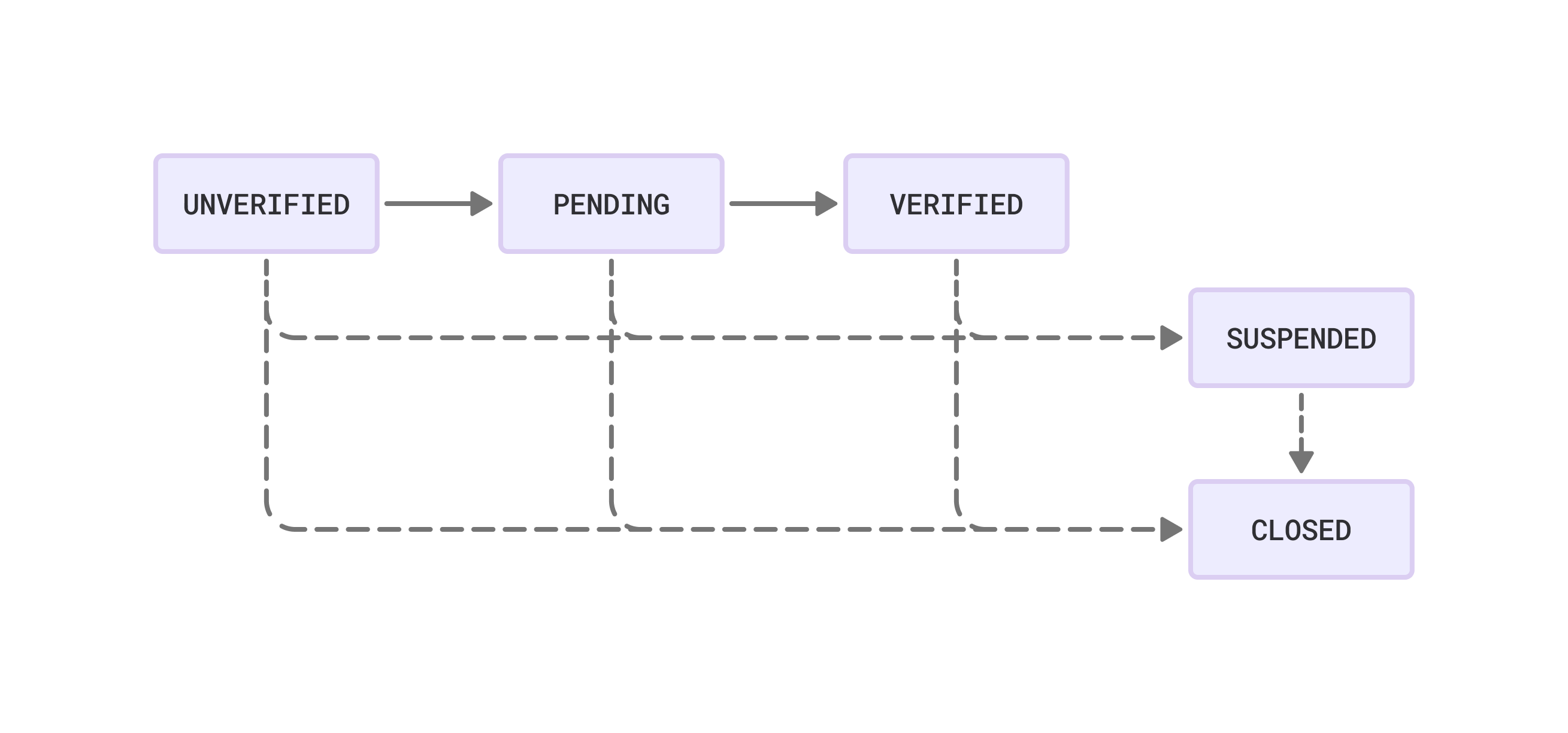
Any user can be moved to SUSPENDED or CLOSED from any state. A suspended user can be restored to their prior state once the issue is resolved.
Promotion
A user is moved to PENDING once their KYB/KYC information is updated either via API or dashboard. When a user in PENDING status has their evidence reviewed and approved, they are promoted to VERIFIED.
Demotion
A user can be moved to SUSPENDED from any state. Common triggers include:
- Missing or expired documentation
- Flagged transactions requiring review
- Pending administrative action
Resolution instructions are typically sent from compliance@checkbook.io. Once the issue is resolved, the user’s access is restored.
Closure
A user can be moved to CLOSED from any state. This is a terminal state — the user can no longer transact or interact with the platform. Common reasons include unresolvable compliance issues or voluntary offboarding.